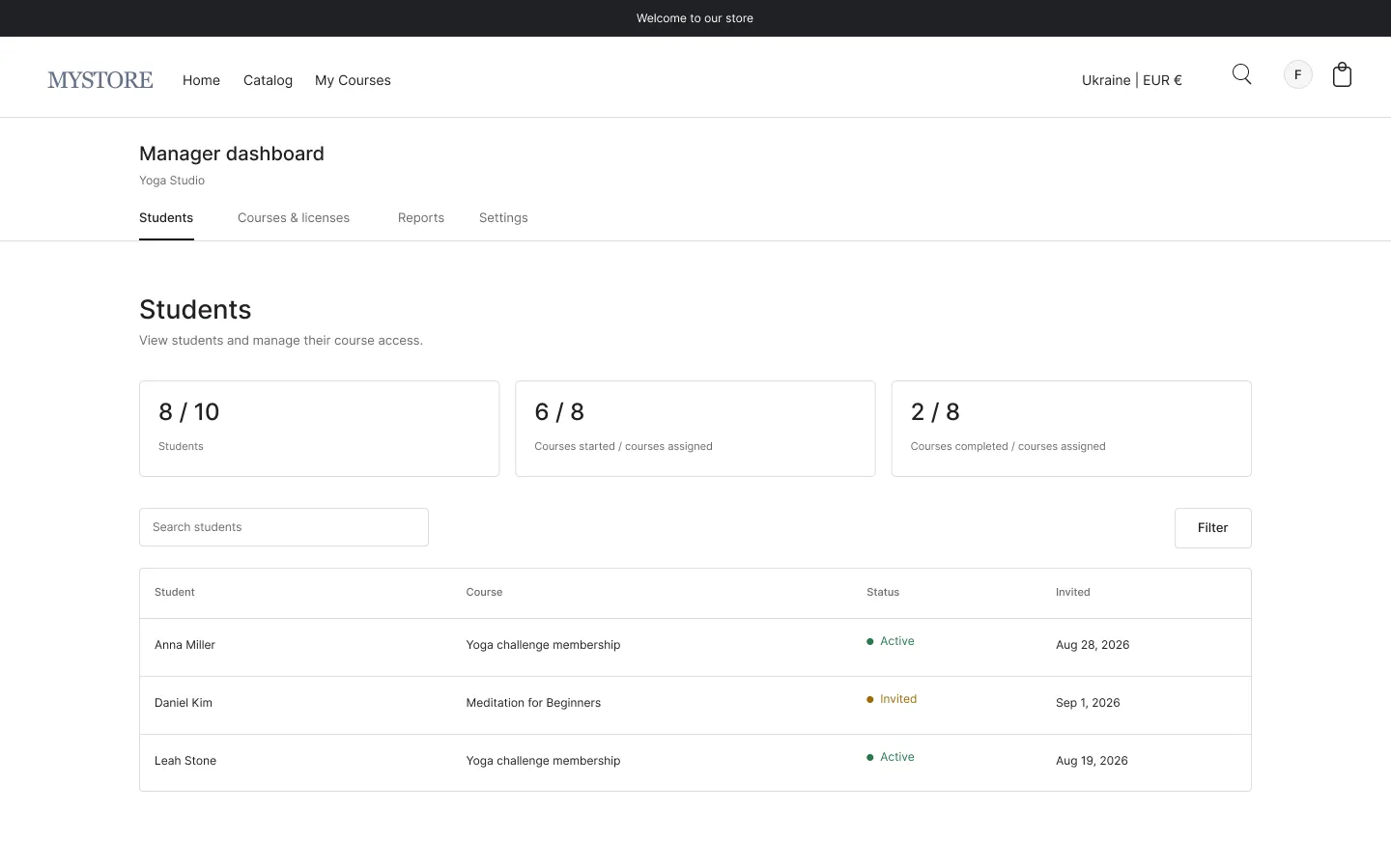
Students: everyone in one list
Counters for invited students, started and completed courses, plus a searchable list with each student's course, status and invitation date.

Let companies, schools and teams buy course licenses in bulk, hand them out to their people and follow every learner's progress — all from one manager's dashboard in your Shopify store.
You sell the course, a manager buys licenses for their team, and students simply learn. Everyone sees exactly what they need.
Turns on the Managers feature in Courses Plus, adds managers by email and gives them course licenses.
Employer, team lead or tutor. Distributes licenses, follows the team's progress and issues certificates.
Employees or learners get access to the assigned courses and study at their own pace.
In Shopify admin open Courses Plus → Settings, find the Manager settings block and turn the feature on.
Click Managers configuration → Add manager and enter their email. The app sends an invitation to create an account — or marks an existing customer as a manager automatically.
Managers buy licenses with a regular order in your store, or you add licenses for specific courses manually — no order needed.
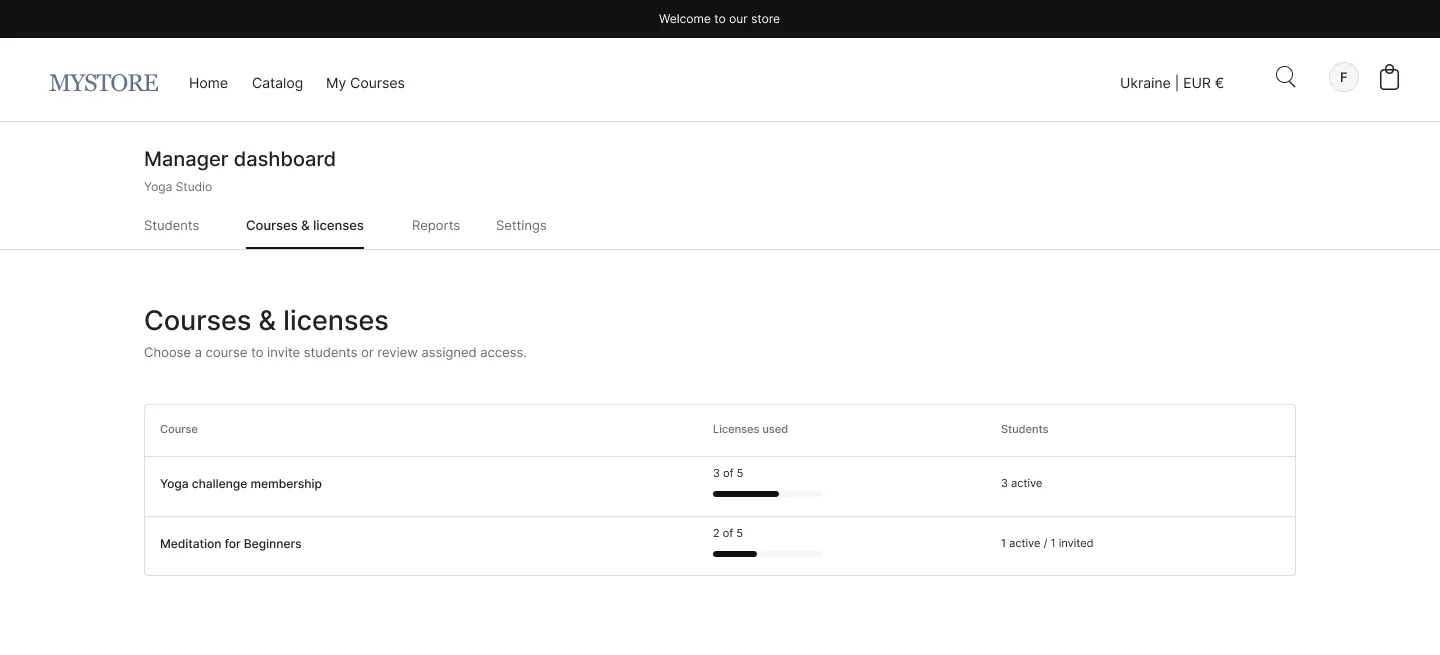
On Courses & licenses the manager sees every purchased course with the licenses used, picks a course and invites students by email — typed in or pasted from Excel or Google Sheets.
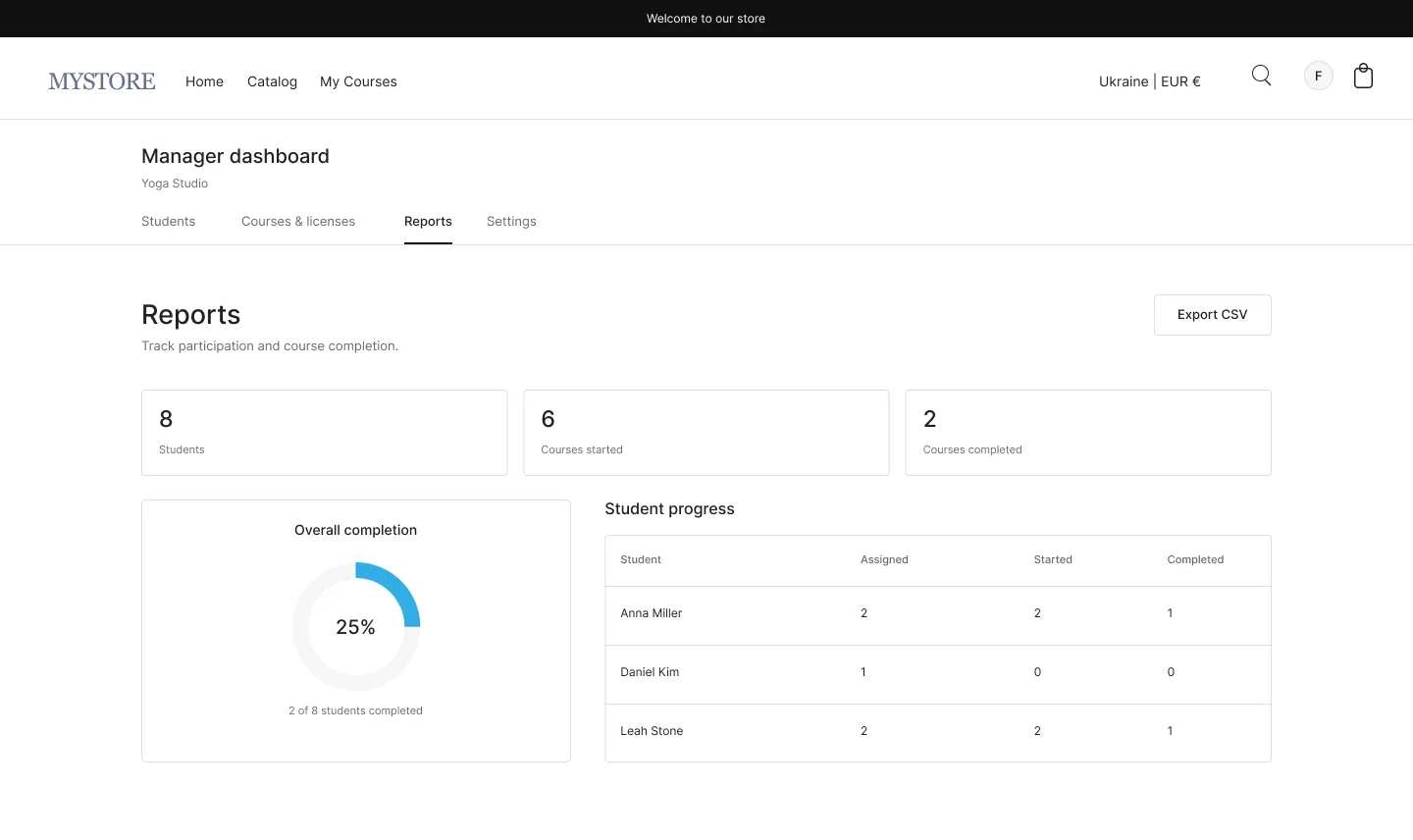
The Reports tab shows started and completed courses for the whole team with CSV export, and each student's page shows completion, scores and certificates.
The dashboard is a page in your store with four tabs: Students, Courses & licenses, Reports and Settings. Here is what managers see.
Counters for invited students, started and completed courses, plus a searchable list with each student's course, status and invitation date.
Every purchased course with the number of licenses used and how many students are active or still invited.
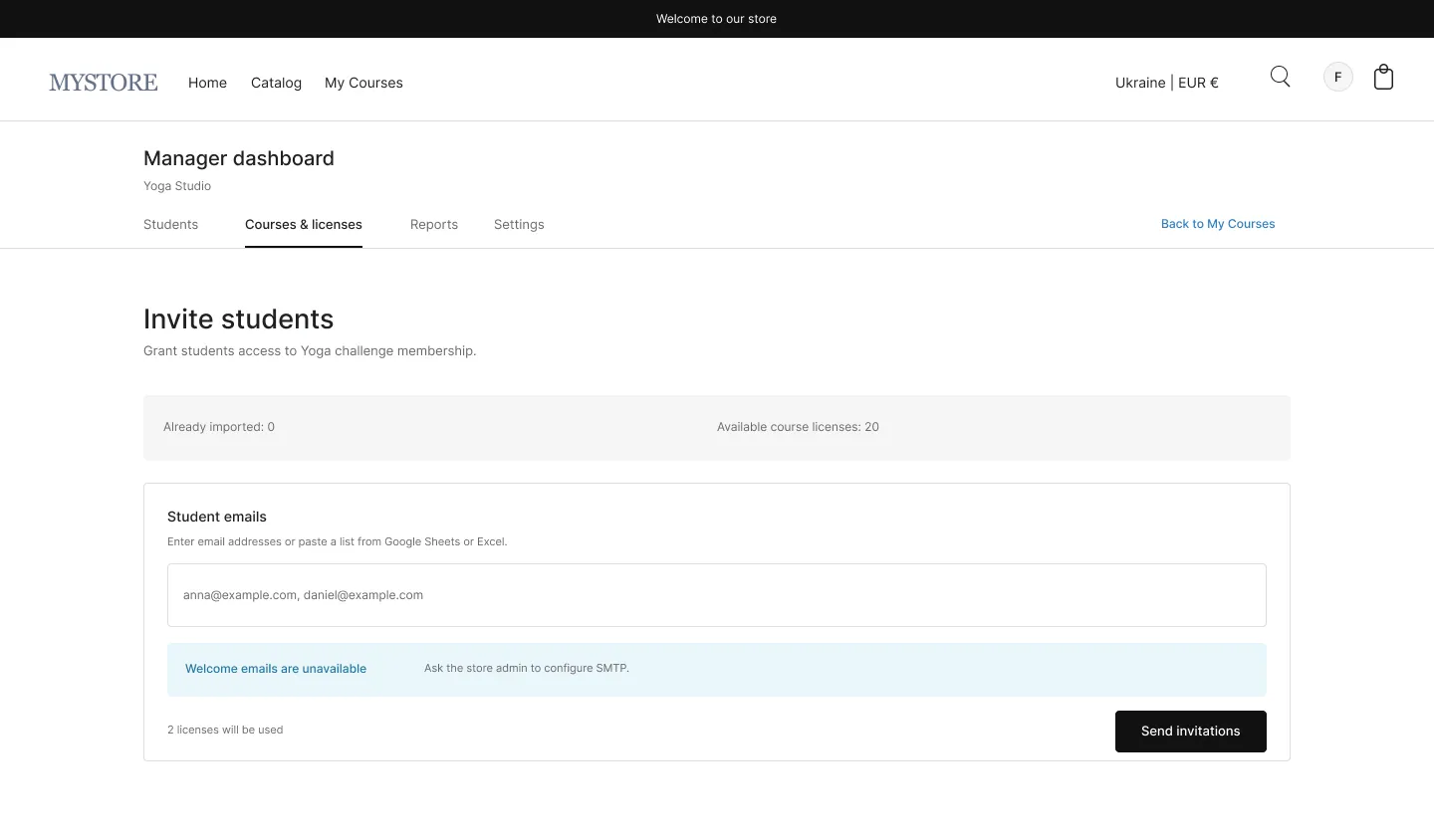
Paste a list of emails from Google Sheets or Excel — the page shows how many licenses are available and how many the invitation will use.
Overall completion for the team and a progress table for every student — download it as CSV in one click.
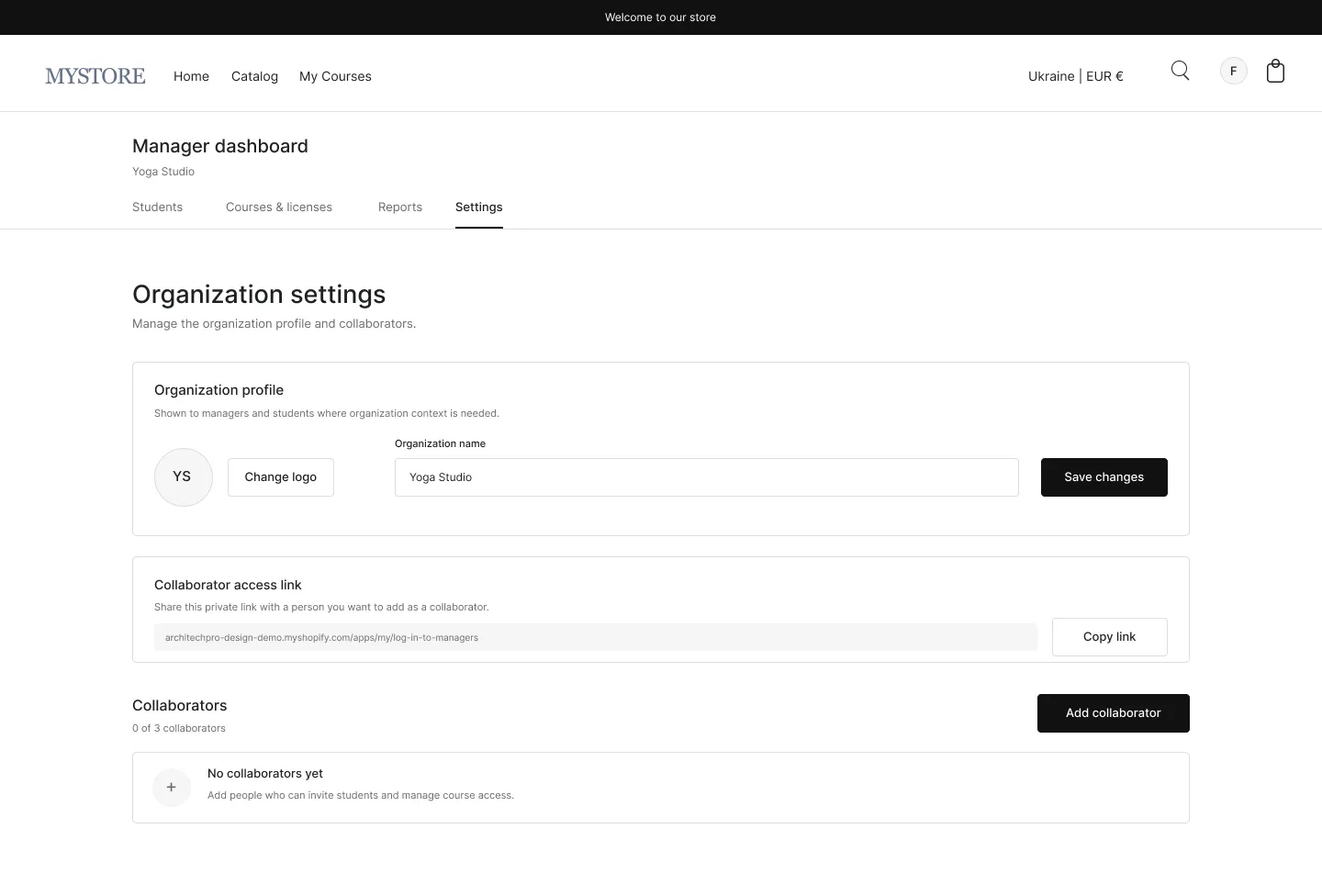
Managers add their organization's name and logo and invite collaborators who help invite students and manage course access.
Managers get their own independent view of their people — without access to your store admin.
See all purchased courses and how many licenses are used and still available for each one.
Add a whole team at once: separate emails with commas or paste a column straight from a spreadsheet.
Overall completion for the whole group and started and completed courses for every student — export it as CSV in one click.
Open any student to see assigned courses, completion percentage, detailed scores and certificates.
Reset a student's progress in a particular course — handy for retakes or fixing mistakes.
When a student completes a course, the manager can generate a certificate with their name, course title and date, and send it to them.
Every invited student with their course, status (active or invited) and invitation date — with search and filters.
Share a private access link to add colleagues who help invite students and manage course access.
Add the organization's name and logo, shown to managers and students wherever the organization is mentioned.
Assign licenses to departments for safety, development or certification training and delegate them to team leads.
Distribute licenses among tutors and let instructors track each student's progress.
Allocate licenses to client organisations and manage all of them from one place.
Give members continuing-education courses and let chapter leaders follow training in their groups.
Train volunteers and staff with skill-building or compliance courses, overseen by department heads.
Run mandatory training programs and give supervisors a clear view of completion within their teams.
A license is one seat in a course. A manager who buys 10 licenses of a course can give access to that course to 10 students.
In two ways: the manager buys them with a regular order in your store, or you add licenses for specific courses to the manager manually in Courses Plus — no order required.
On the Courses & licenses tab the manager picks a course and enters email addresses, separated by commas or pasted from Excel or Google Sheets, then clicks Send invitations. They can invite as many students as they have licenses left, and a large list is processed in the background.
No setup on their side. When you add a manager by email, Courses Plus invites them to create an account — or, if the customer already has one, marks it as a manager automatically.
Assigned courses, completion percentage, detailed scores and certificates. The Reports tab also shows overall completion for the whole team and started and completed courses for every student.
Yes. The Reports tab has an Export CSV button, so the manager can download the team's progress and share it, for example with HR.
Yes. In Settings the manager can add collaborators — people who can invite students and manage course access — by sharing a private collaborator access link.
Yes. From the student's page the manager can reset progress in a particular course, for example for a retake.
Yes. Once a student has completed a course, the manager can generate a certificate with the student's name, course title and completion date and send it to the student.
The manager's dashboard is a page in your store. Its URL is available in the Courses Plus app, so you can add it to your store menu or share it with managers.
Step-by-step guides with screenshots are in our Help Center.
Install Courses Plus, enable Managers and start selling course licenses to companies, schools and organisations.